
In the Name of Allah, The Most Gracious, Ever Merciful.
Love for All, Hatred for None.
| اگر آپ یہ اردو الفاظ اسی طرح ٹھیک پڑھ سکتے ہیں جیسا کہ مندرجہ ذیل اسلام کے بارے میں جملہ لکھا ہوا ہے تو پھر اردو فونٹ آپ کے کمپیوٹر پر انسٹال ہوگیا ہے یا پہلے سے ہی موجود ہے ۔اس لئے آپ کو مندرجہ ذیل ہدایات پر عمل کرنے کی ضرورت نہیں۔ ۔ لیکن اگر یہ تحریر کا انداز ویسا نہیں تو آپ فونٹ انسٹال کرکے اس کو مزید نکھار سکتے ہیں۔ شکریہ اور جزاکم اللہ |
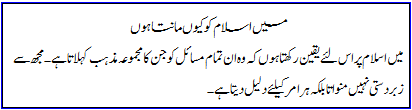
How to install Urdu Fonts on Windows | اردو فونٹ کیسے انسٹال کریں؟ |
| If you are using Windows XP or Vista computer, you can download and run this program: Jameel Noori Nastaleeq Urdu Fonts Installer - click here to download. When you click, you will see the following popup window, please click on the Run button: | اگر آپ ونڈوز کمپیوٹر استعمال کررہے ہیں تو آپ ایک خوبصورت نستعلیق فونٹ جمیل نوری یہاں کلک کرکے ڈاؤن لوڈ کریں اور اپنے کمپیوٹر پر اس پروگرام کو چلائیں تو یہ اردو فونٹ آپ کے کمپیوٹر پر انسٹال ہوجائے گا۔. جب آپ یہ ونڈو دیکھیں تو Run کا بٹن دبائیں |
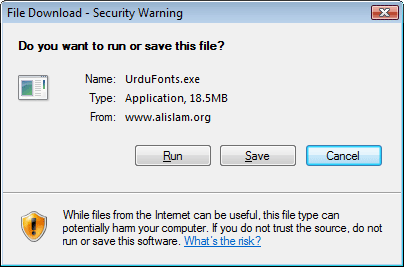
| |
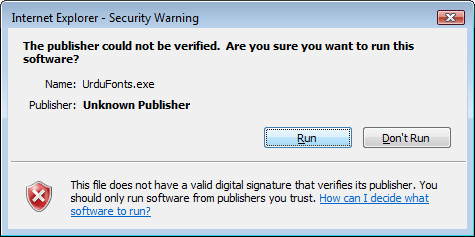
| and click on Run again if you get this popup window: | اور اب اگر یہ ونڈو دیکھیں تو پھر Run کا بٹن دبائیں |
| |
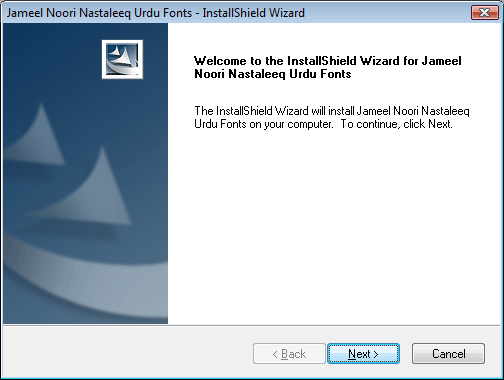
| after this click on Next button on this screen: | اس ونڈو پر Next کا بٹن دبائیں |
| |
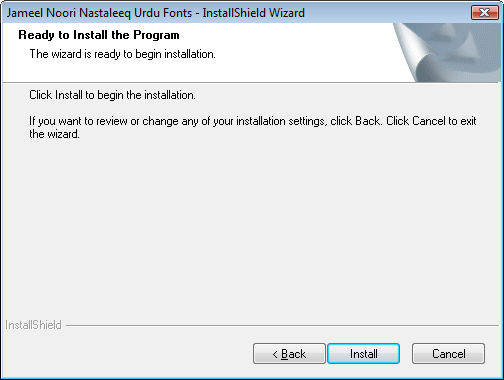
| Next click on Install button: | اور اب Install کا بٹن دبائیں |
| |
| The Urdu Fonts will be installed after this step. Please restart your Internet Browser. Enjoy reading Urdu after that! | اس کے بعد اردو فونٹس انسٹال ہوجائیں گے۔ اپنے انٹرنیٹ براؤزر کو بند کرکے پھر چلائیں۔ اس کے بعد آپ الاسلام اردو صفحات کو نستعلیق میں پڑھ سکتے ہیں۔ |
If you get a warning on Windows Vista that a program is trying to access your computer, please allow it to run so it can install the font. After this the font will be installed and you can close the window, and restart your browser or refresh/reload this page to view the text in newly installed font. If you install the font again when new update becomes available, you may need to restart your computer.
- Visit Urdu.ca for Urdu Keyboard installation and activate Unicode Urdu in Windows XP (already available in Windows Vista)
- Urdu Unicode Text Conversion from InPage and Using Urdu & Arabic Fonts (Video Tutorial)
- Urdu Unicode text to InPage import tutorial (Video Tutorial)